A holiday tracker spreadsheet is fine for small teams to track annual leave, often if there's one approver. You might even get away with it for longer if you've used a good setup, or if you know Excel to a really good level. We found it stopped working once we got to around four or five people, and particularly the moment there was more than one manager approving leave. The issue was that shared access meant people getting locked out, multiple versions ended up getting saved, and only one person knew how to fix the formulae when they inevitably broke. At that point we moved to a simple online leave tracker that everyone could access, that gave us requests and approvals from our phones without needing to email, showed the whole team on one calendar and kept a dated record of every request. For growing businesses, or anyone who doesn't enjoy Excel admin, moving to an online holiday tracker like Book Time Off is the obvious choice.
Annual leave is one of those things that feels trivial to a business owner concentrating on 20 different things at once. You start by keeping a mental tally of one person and when they're off, that's easy to remember. Two, three, four people you move to a basic spreadsheet that you made. But with five to ten people, two managers, multiple allowances and a busy summer to get right, it's a totally different job. The spreadsheet tool you start with rarely grows and often buckles under pressure beyond a few people. This guide is written from experience. Book Time Off exists because our own leave spreadsheet got unmanageable and we needed something simpler than a full HR system to replace it. Below we cover the common pitfalls and the real advantages of spreadsheets, then how an online booking and tracking system does the same job without the admin.
Tracking holidays with spreadsheets
The traditional way to track annual leave in a small team is a spreadsheet and it can genuinely work well. If your team is small, requests are occasional, there is only one approver (one boss, one director), and you do not mind a little extra admin, a plain sheet with columns for names, dates and approval status does the job. Something like this:
A simple leave spreadsheet. Clean, free and perfectly workable, for a while.
There is nothing wrong with this. It's free, familiar and, for a handful of people, it is genuinely the right tool. If that describes you, keep going. You might even want to consider downloading our free spreadsheet tracker if you want an upgraded version.
Free annual leave tracker (spreadsheet)
Not ready to leave spreadsheets behind? Start from a good one. Our free tracker is pre-built for Excel or Google Sheets, so you skip the fiddly setup and get straight to tracking.
- Ready-made columns for names, dates, days and approval status
- A remaining-days formula that does the maths for you
- Malta public holidays already filled in
- Works in Excel or Google Sheets, free to copy
Where spreadsheets break down
In our experience, once the team grew past four or five people, one spreadsheet couldn't cope. Different people started requesting leave from different managers, which meant shared access and shared access meant conflicting changes and broken formulas. Then every request sparked a dozen questions from everyone else... how many days do I have left, when is that person off, can I take that week too? It all became very convoluted, very quickly.
The same sheet, six months and three editors later. Two versions in circulation, a formula overwritten and nobody sure whose leave is actually approved.
None of these are massive failures on their own, but for us they stacked up and it meant several people wasting hours every month on things like:
- No live balance. "How many days do I have left?" was the big question and it was never right, always the first formula to break.
- No clash control. There was no warning when two requests came in for the same week and then we ended up running on minimal staff at busy times.
- Version chaos. At one point we had seven versions of the holiday tracker saved in the same folder. None the same and none right!
- Bank holidays by hand. Every January someone had to add the year's public holidays and remember not to deduct them when people booked dates around them.
- No record. When an approval was later disputed, there was no dated trail of who requested what and when it was agreed.
We're about to get into how an online holiday tracker stops all of this, with ease. But if you'd rather skip it and play around for yourself, there's a free 30-day trial (no card needed) so you can see just how pain-free it is.
→ Start free trialIf you have reached this point, it is probably time to think about a proper annual leave tracking system. Not a full-on HR platform but something simple built for exactly this job.
Tracking annual leave with Book Time Off
We built Book Time Off for teams in precisely that position: people who have outgrown a spreadsheet but are nowhere near needing a full HR back-office system. It does one thing properly, tracking who is in, who is off and who has how many days left, without the bloat. Here's what it actually looks like.
The whole team on one timeline
Everyone's leave in a single view, with each person's remaining balance updating live down the right. No private copies, no "which version is this?"
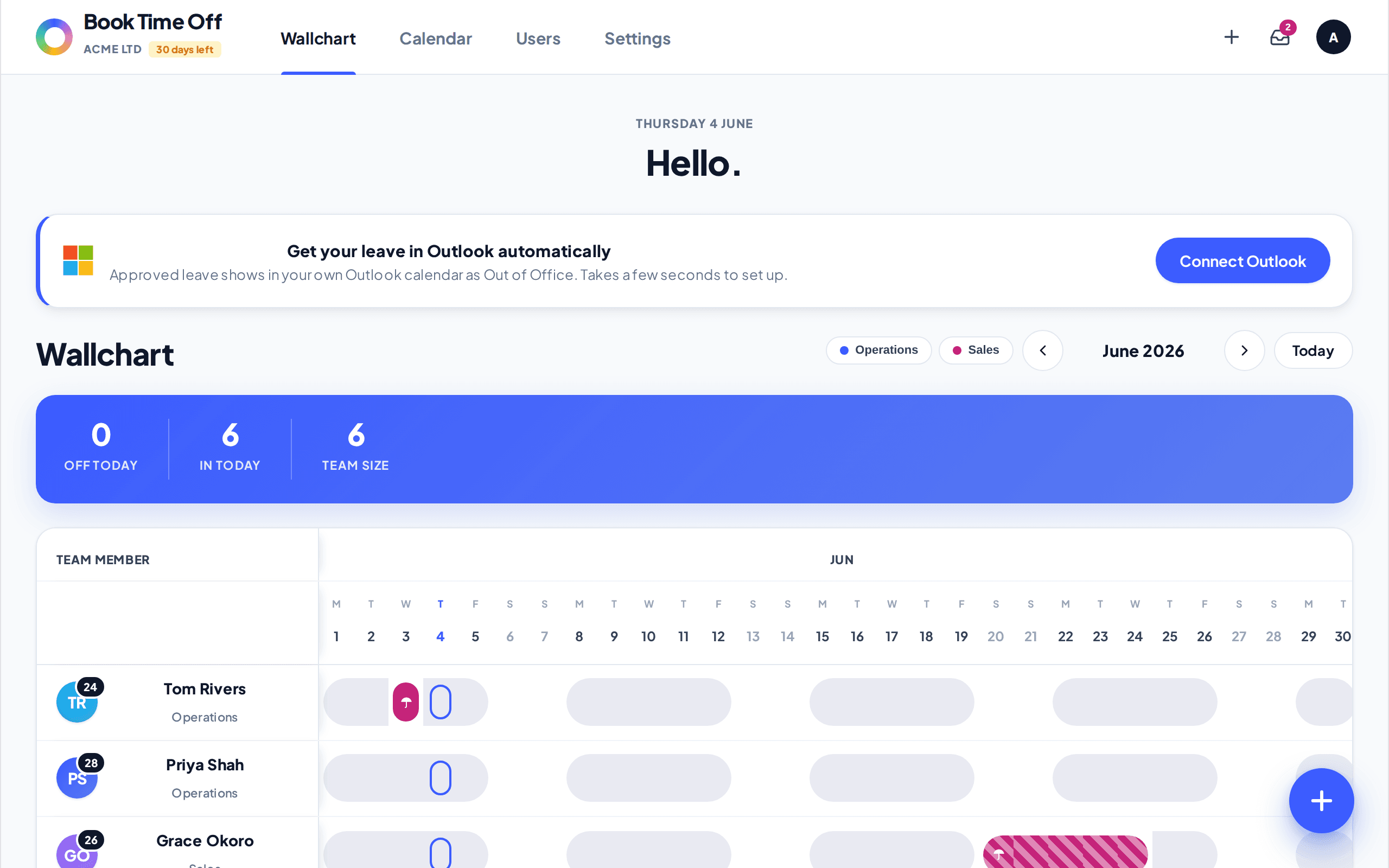
The team wallchart. Away days in each person's colour, pending shown as an outline and the days-left column on the right stays current automatically.
One shared calendar, one version of the truth
A month view of who's off, who's pending and the next public holiday. Malta's 14 public holidays are built in and never deducted from anyone's allowance.
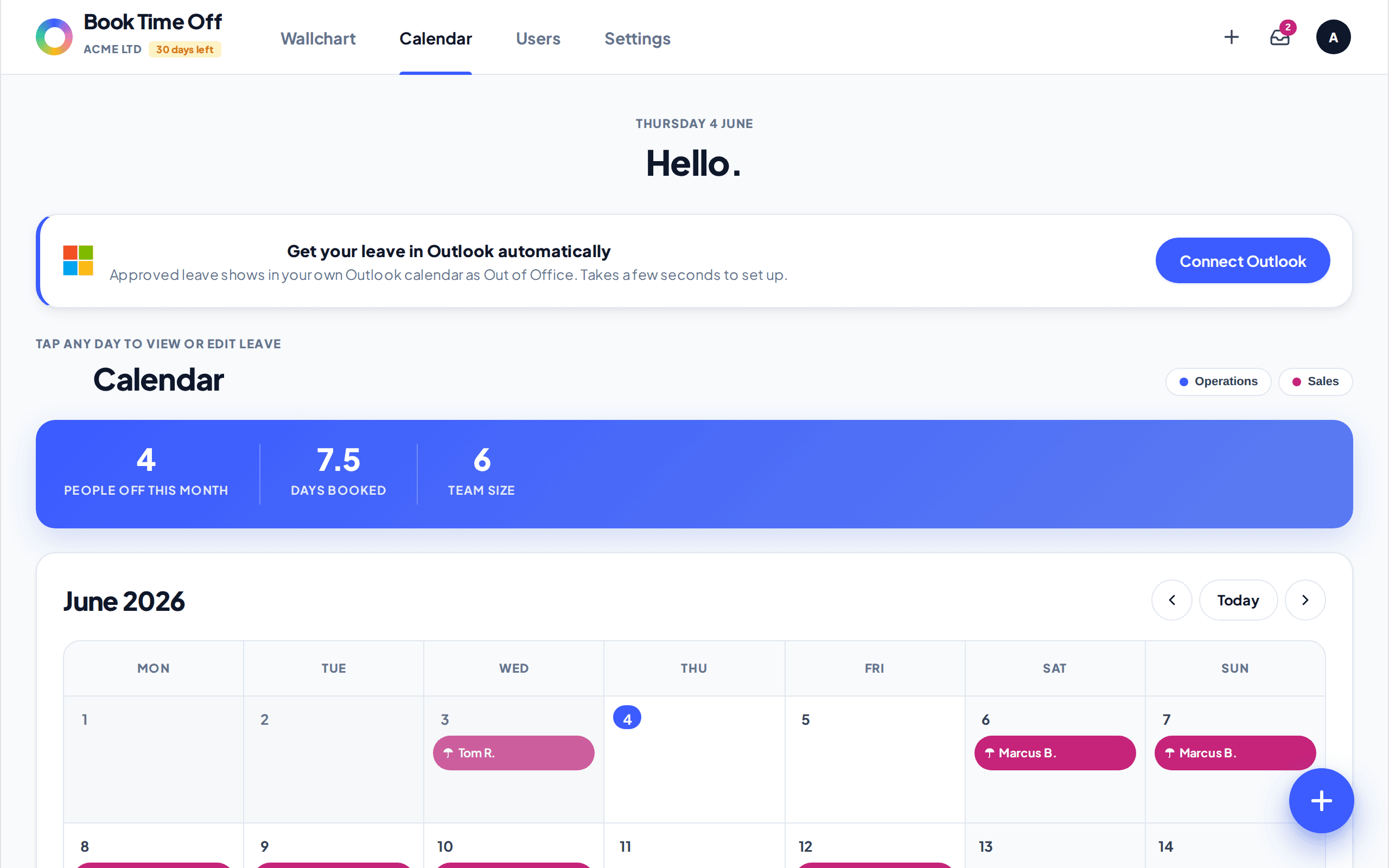
The shared calendar. Weekends and public holidays are shaded and never deducted, and a half-day booking is tagged AM or PM.
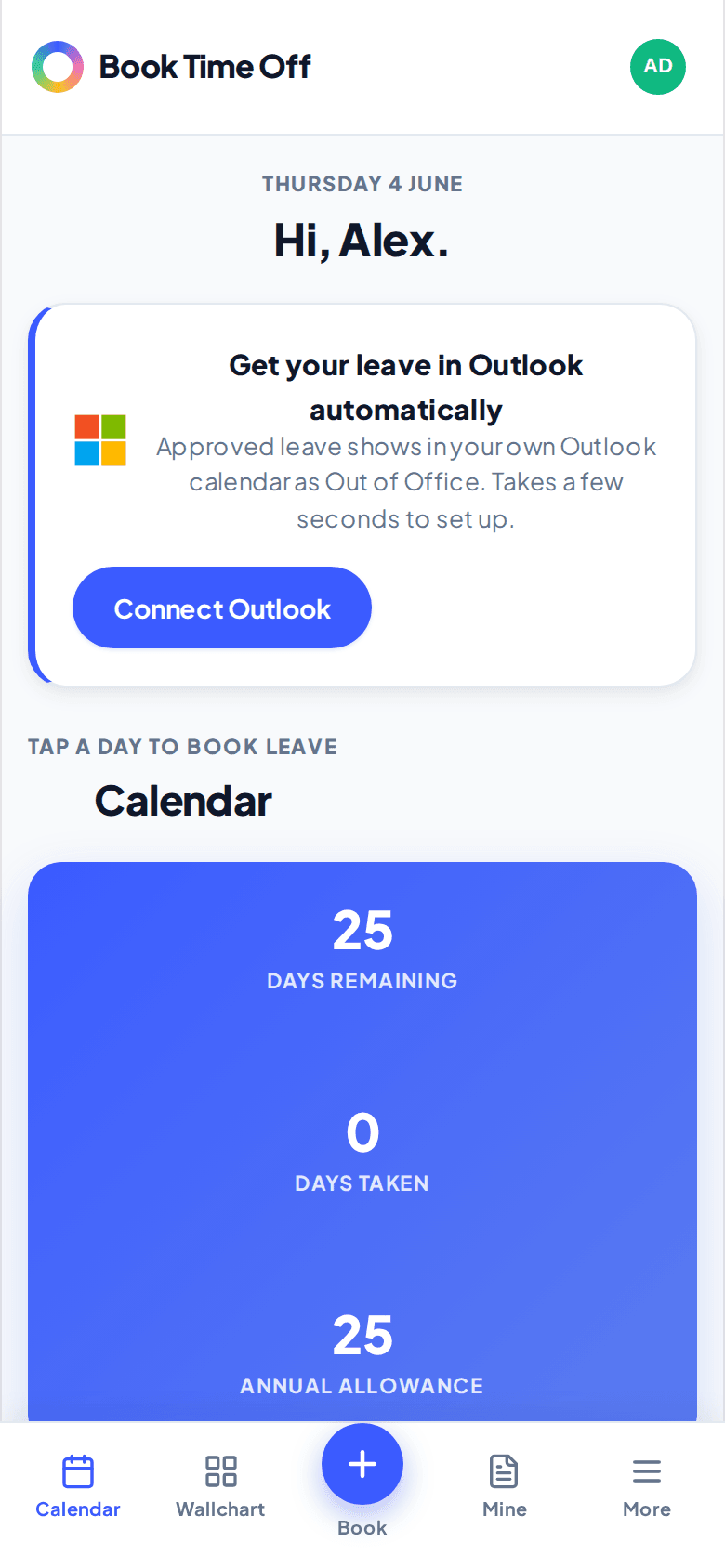
Request in a tap, check your balance any time
Staff book from their phone in seconds and see exactly what a request will cost them before they send it. Annual leave is the only type that touches the allowance, so the maths is always right.
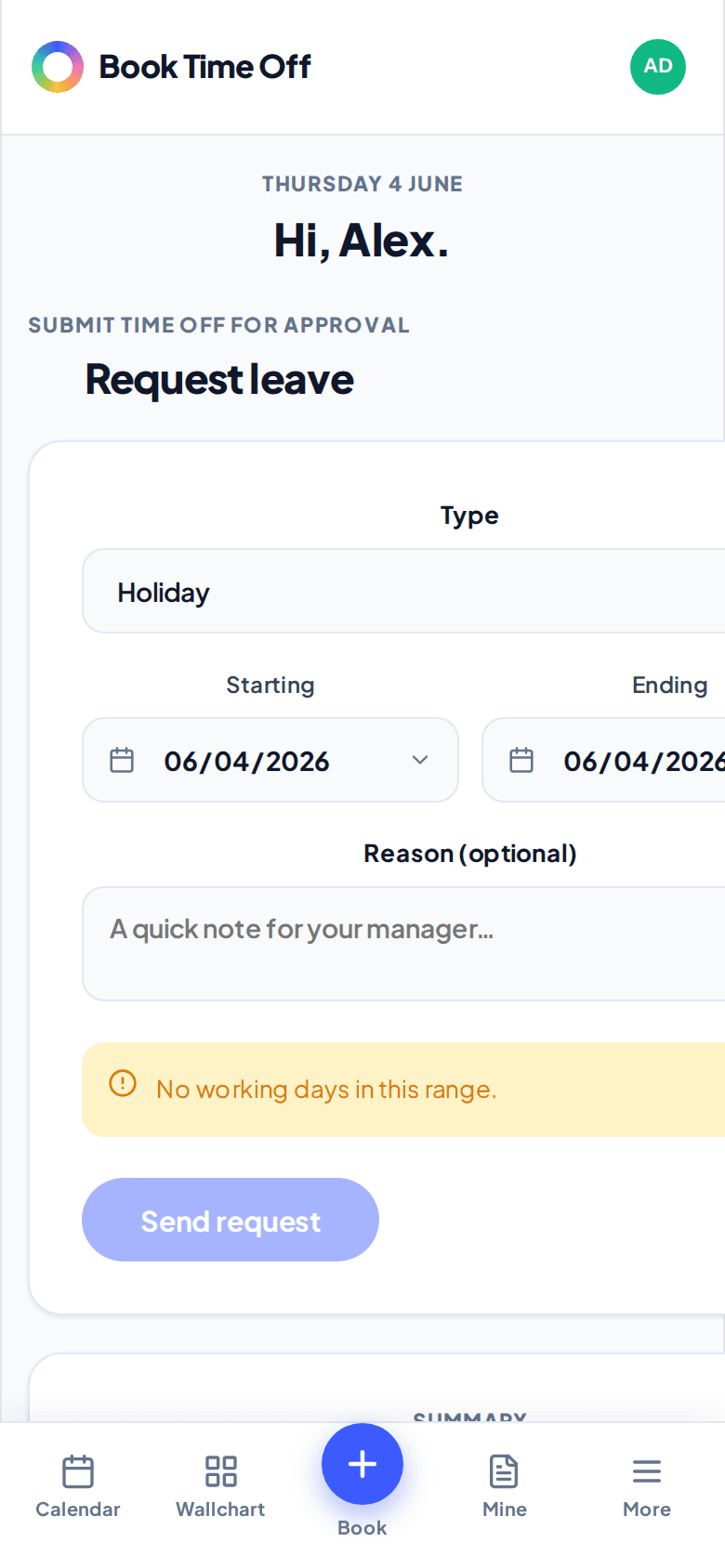
Approve or decline in one click
Approvers get an email and a tidy inbox. One tap approves the request, emails the person, updates their balance and drops the booking on the calendar, the whole loop that used to be five manual steps in a spreadsheet.
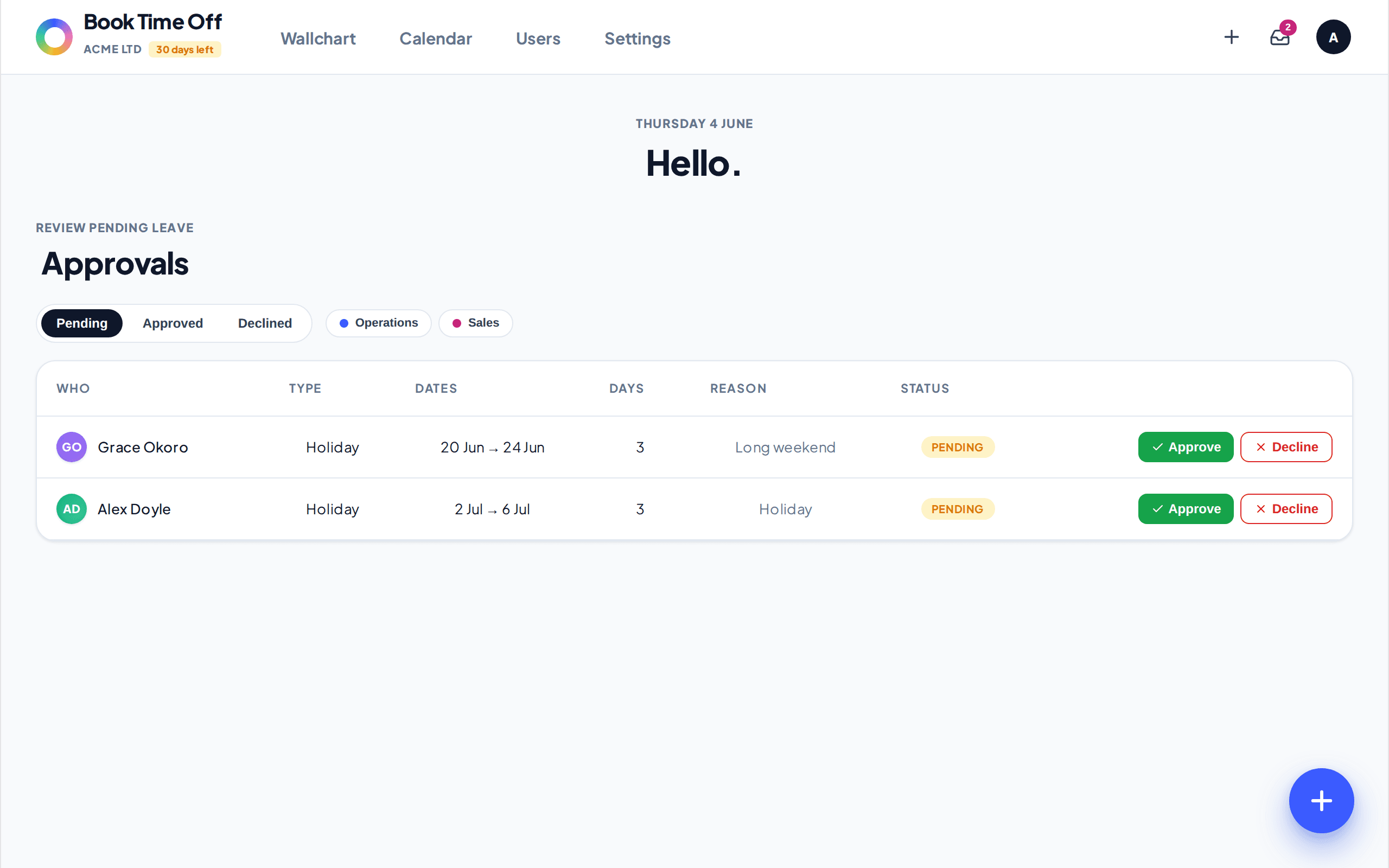
The approvals inbox. Each request shows the dates, the length and the balance before and after, so a decision takes a second.
Malta's 14 public holidays built in and never deducted. Multiple recorded leave types (sick, parental, unpaid and your own). Email notifications on every submit, approve and decline. And views in Outlook, Google or Apple Calendar and Slack, so the team sees who's off wherever they already work.
Beyond what a spreadsheet can do
Replacing the spreadsheet is the point. But a purpose-built tracker also quietly does a few things a spreadsheet never could, the kind of thing you wouldn't think to associate with leave tracking until you have it.
Birthdays and a weekly roundup
A weekly email lands every Monday with who's off that week and whose birthday is coming up. Never miss a card and never get caught out by who's away.
A reporting view
Break leave down by person, department, month and type, with charts. Spot the sick-day patterns and the August pile-up before they hit coverage.
See who is not taking time off
Days remaining stays visible and the report shows who's barely touched their allowance all year. Nudge them to book before they burn out.
The reporting view is really worth highlighting. We had no idea how much our leave clustered around certain months and managing that solved huge headaches. Knowing who hadn't used any holiday all year going into the final quarter also meant we could manage that and ensure we didn't get a whole month request in December!
Days taken by month. The August and December peaks are where coverage gets tight, easy to plan around once you can see them.
Spreadsheets vs Book Time Off
Here's the honest side-by-side. Both are free to start (a spreadsheet forever, Book Time Off for 30 days), but everywhere the day-to-day actually happens, a purpose-built tracker does the job for you.
| What matters | Spreadsheet | RecommendedBook Time Off |
|---|---|---|
| Up-front cost | Free | 30 days free, no card |
| Ongoing price | Free | €1 / user / month |
| Version control | Conflicts and copies | One source of truth |
| Request and approve from a phone | No | One-click email approvals |
| Live balance and days remaining | Manual formulas | Automatic |
| Clash and capacity control | None | Per-team limits |
| Malta public holidays | Added by hand | Built in automatically |
| Multiple leave types recorded | Extra columns | Built in |
| Reporting and patterns | Pivot tables, if you build them | Charts and CSV export |
| Calendar and Slack integrations | No | Outlook, iCal, Slack |
| Admin time | Grows with the team | Runs itself |
Stay on a spreadsheet while your team is tiny and requests are rare, it'll do for now and it's free. The moment you notice yourself rebuilding a formula, reconciling two versions, or fielding "how many days do I have left?" for the third time in a week, move to a dedicated tracker. For most Maltese small businesses Book Time Off is the best way to make that jump.
Other ways to track annual leave
Book Time Off is not the only option and it isn't right for everyone. If you are a much larger organisation with 100+ people, complex payroll, benefits administration and multi-level HR workflows, there are fully integrated HR and payroll platforms that handle all of that. They are powerful and obviously come at a cost far beyond what a growing small business needs.
The honest way to choose is by the problem you are trying to solve:
| Your situation | Best fit |
|---|---|
| A handful of people, one approver, rare requests | A shared spreadsheet is fine |
| 5 to 100 people who need to track who is off and manage requests smoothly | A focused leave tracker like Book Time Off |
| Hundreds of employees across multiple sites needing full back-office and payroll integration | A larger integrated HR and payroll platform |
If your challenge is simply tracking who is off when, and handling leave requests without the admin and spreadsheet nightmares, then Book Time Off is built for exactly that. If you have hundreds of staff across multiple locations needing deep payroll and benefits integration, one of the bigger systems might be a better fit.
What does it cost?
Spreadsheets are free up front, of course, but the hidden costs stacked up quickly for us. The admin time spent tracking requests and counting balances, the conflicting changes, the frustration for everyone whether they are asking for leave or approving it. It's the time taken on all of those things that could have been better spent on growing the business that really costs, even if it doesn't come on an invoice!
Book Time Off is a flat €1 per user / month to remove all of the headaches. For a team of ten, €10 a month takes away all the hassle and means annual leave (and the dreaded holidays spreadsheet version 17!) just aren't a part of the day-to-day. There's also a 30-day free trial and no card required so you can enter your team and play around with it before you decide. For most growing businesses it is a straightforward call.
Ten people at €1 each is €10 a month. If Book Time Off saves you even half an hour a week of spreadsheet admin and chasing, it's more than paid for itself before you've even manually counted up how many days someone has left for the second time today!
Is it easy to move from my spreadsheet?
Check it out for yourself with a free trial, but for most small teams everyone's up and running in minutes. A simple setup invites everyone by email and they set their own password, so they're requesting, approving and checking their remaining days moments later. If you're coming from Timetastic, you can bring your people, departments and this year's approved leave across in one upload.
Summary
Spreadsheets have a real place in small business leave tracking. They are simple, free and perfectly fine for tiny teams with the time to handle the admin. But the spreadsheet that served you well at four people can quickly become a burden rather than a help as you grow: broken formulas, conflicting versions and loads of questions from the team that no one can answer at a glance.
Book Time Off is simply the best way to track holidays once you get to that stage. It's cost-effective, it does precisely what you need and it throws in a few things you would never associate with leave tracking: never forgetting a birthday, seeing the clashes and holiday bottlenecks before they happen and helping your team actually use their time off so they stay fresh and productive. When your spreadsheet starts to annoy you, that's the signal to switch.
Related reading
Sources
| DIER | Vacation leave entitlement · Verified July 2026 |
| gov.mt | Public holidays in Malta · Verified July 2026 |
| Legislation Malta | Employment and Industrial Relations Act (Cap. 452) · Verified July 2026 |
| Legislation Malta | S.L. 452.87 · Annual Leave National Standard Order · Verified July 2026 |