PeopleHR · An honest review with screenshots
PeopleHR is Access Group's HR platform. Reviewing the whole product would take a long time as it's an all encompassing, feature heavy HR suite. When we searched online for annual leave software though, they very clearly featured in the sponsored results. For a product that offers a much wider range of functions than just leave tracking we thought it would still be worth reviewing their leave tracking facility as they're clearly a player in the space.
It's perhaps worth noting early on that their £3 per user per month price point may not seem competitive when stacked up against Book Time Off at £1 or Timetastic at £1.20 however you're buying a wider product, not just a leave tracker so it's not a direct comparison and that's why we're really reviewing and comparing the functionality of the leave tracking element only.
First impressions
You get a 14 day trial with PeopleHR. It's not as long as a lot of the competition and it's clear from the outset that you're against the clock with quite a lot to do.
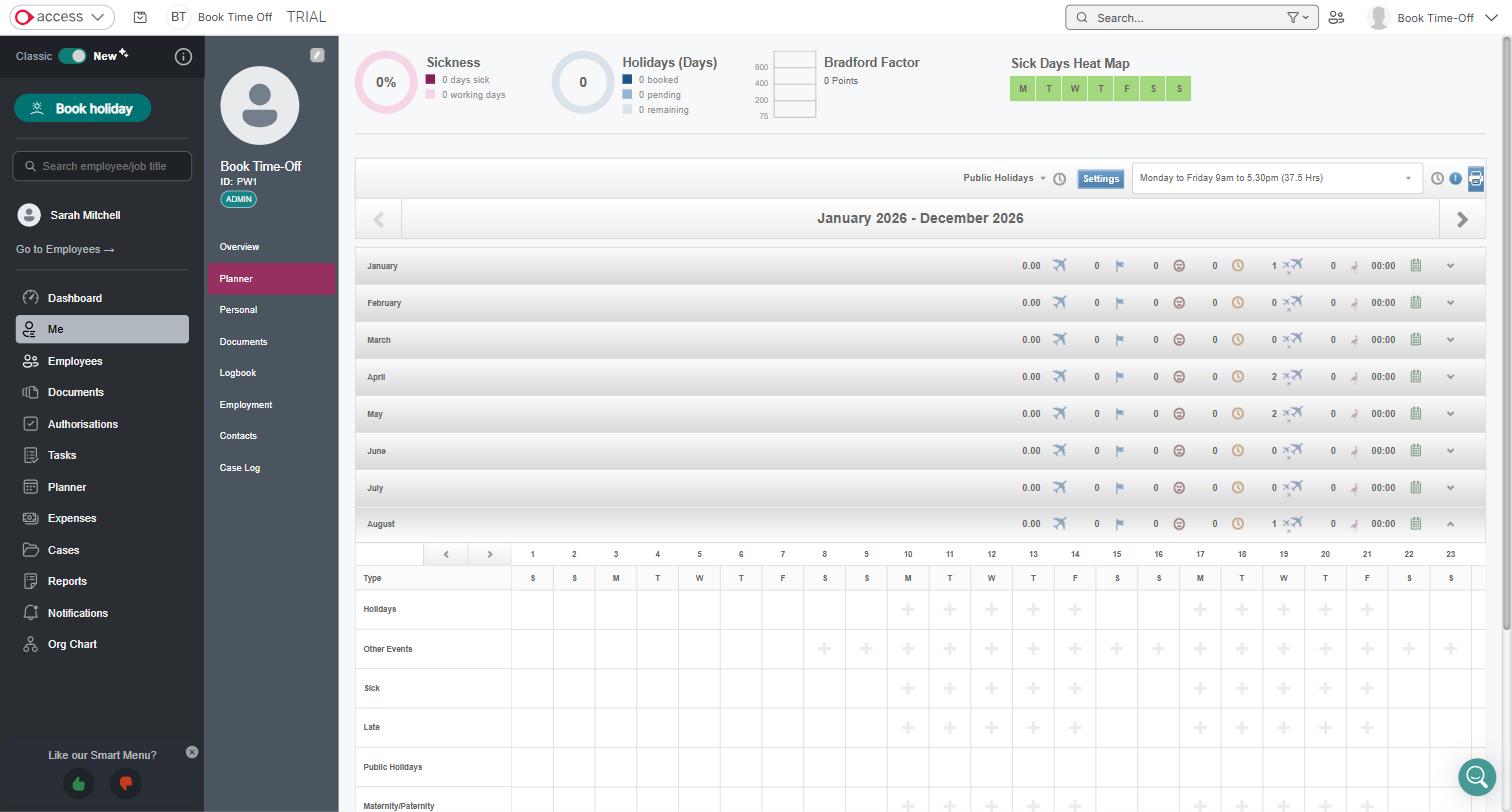
Once you're logged in you're greeted with a dashboard that's pre-loaded with 17 fictional demo employees. You're shown a sickness percentage ring, a Bradford Factor score and a 12 month sick days heat map, all for yourself. Some advanced features for sure but possibly too much for a small business looking for a simple way to book and track their holidays.
Far from the advert that offers to "Ditch Your HR Spreadsheets", this immediately feels like a whole lot more.
PeopleHR
Book Time Off

By comparison, Book Time Off is clearly aimed at the simple, growing business who aren't quite ready for the murky depths of Bradford Factor scores and sick day heatmaps. We chose a simple month grid showing booked leave and obvious navigation to booking more or seeing who else is off.
Read on for the full review, or trial Book Time Off for free now · a simple leave tracker, not a second HR department.
Team set-up
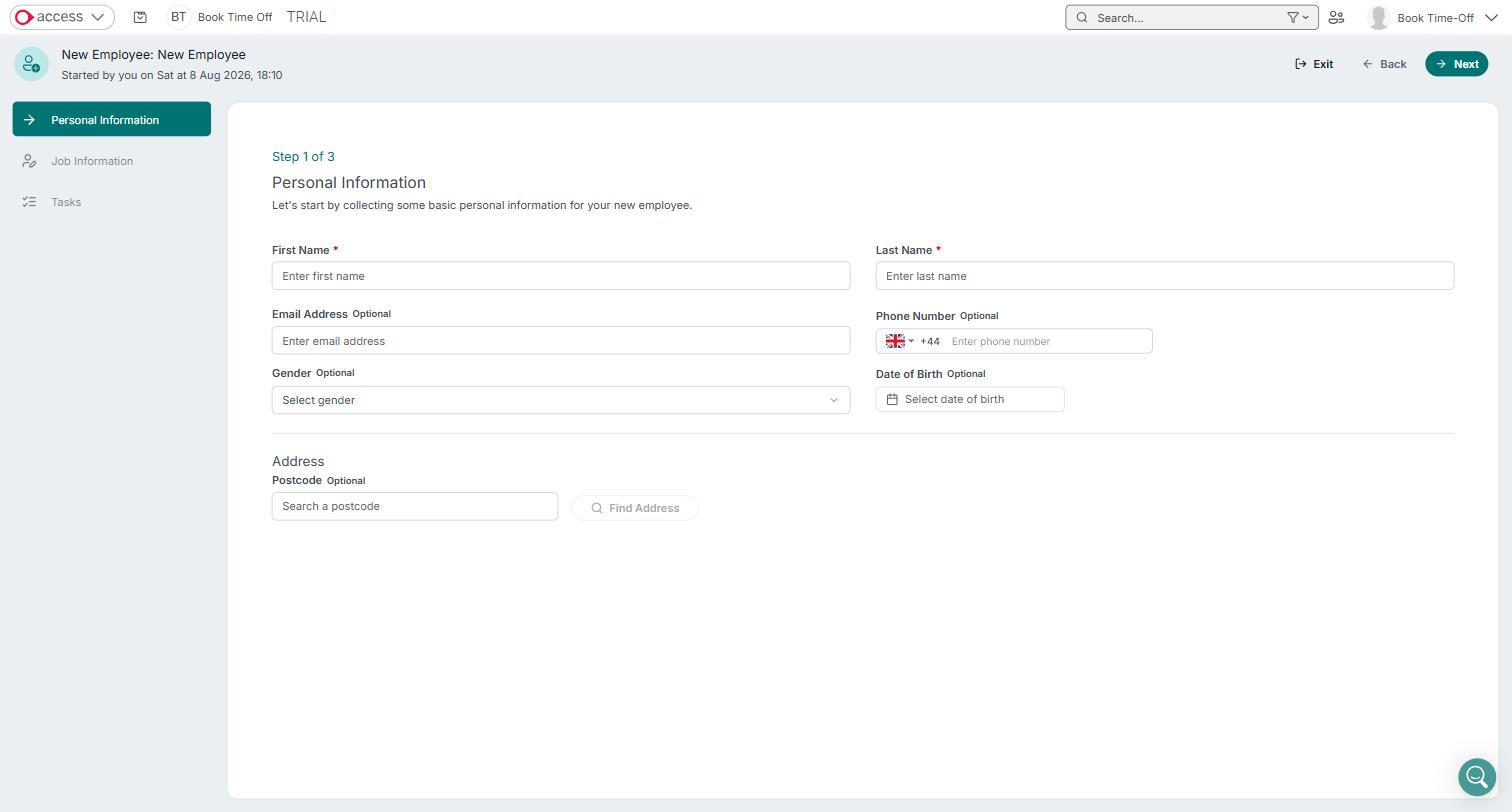
For a much bulkier system, one thing PeopleHR keep really simple is adding people. It's a 3 step wizard that asks for Personal Info, Job Info & Tasks. First and Last name are mandatory but apart from that you can skip the rest if you just want to get to it and play around.
There was no option for a bulk upload as we moved through the wizard and that might be handy for those moving from spreadsheets or other systems.
The trial starts out with 17 pre-loaded demo users which is handy for exploring but a bit cluttered and we wasted a bit of time clearing those out so we could just see our own team and the names we wanted on there.
PeopleHR
Book Time Off

Being a simple leave tracking system, we kept things as obvious as they need to be. A single modal to add users and the option to import from Timetastic as well. No demo users to delete and you're looking at the names of your own team in a couple of minutes.
Calendar and leave types
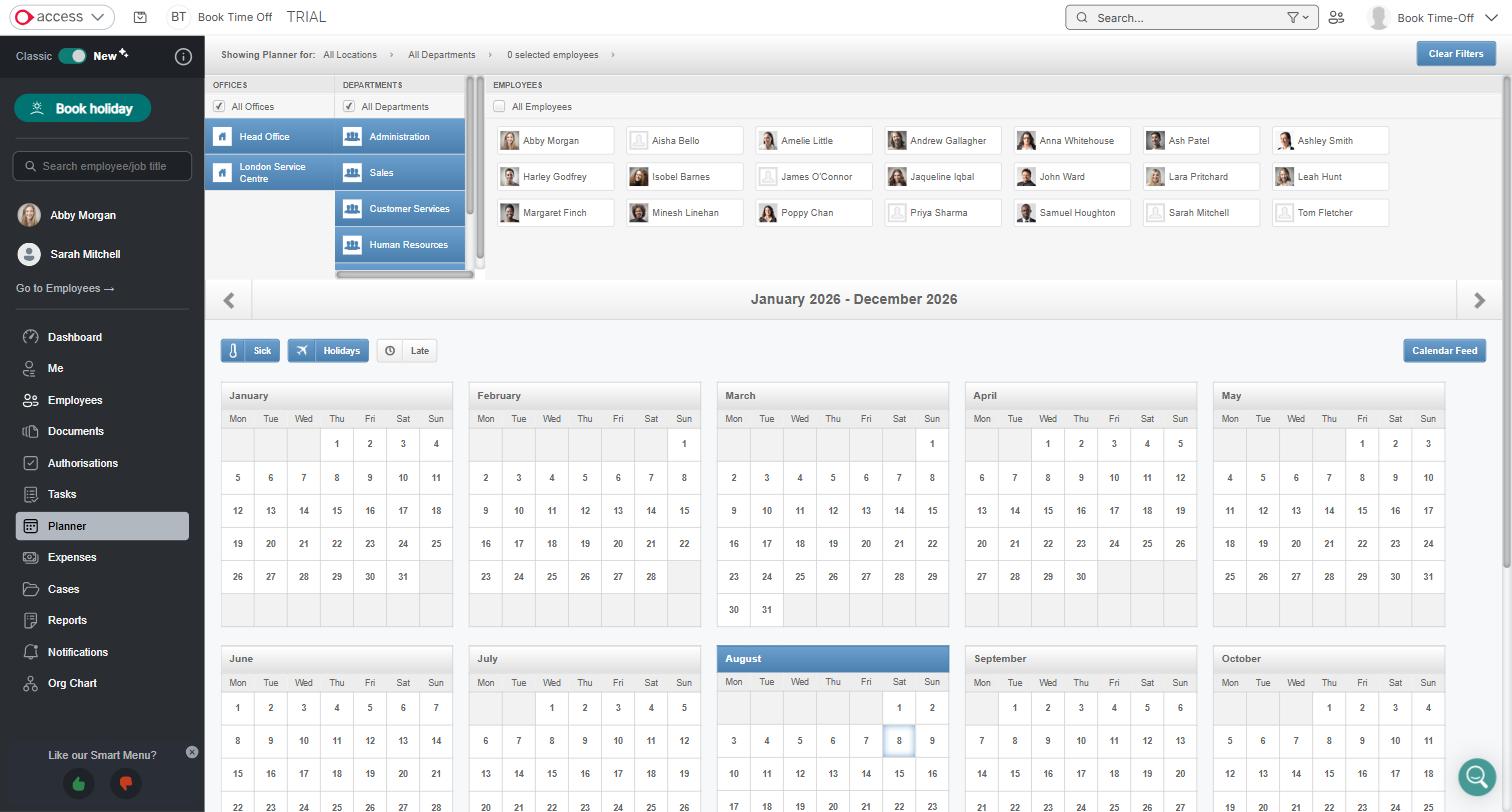
PeopleHR call this section the Company Planner and it's a 12 month grid that can be filtered by office and department as well as for sickness, holiday and lateness. It works well for larger companies wanting a snapshot overview but feels hefty and dated compared to its solely leave-tracking counterparts.
Leave types are configurable for individual users or organisation-wide. Again, it's clear this will suit larger companies that perhaps have localised policies within offices or departments.
PeopleHR
Book Time Off

When we built Book Time Off we had the small business owner in mind. It was exactly the kind of experience we had with PeopleHR that showed us we wanted something different which catered for them.
A simple company wide leave policy making things clear for growing teams with per-person overrides when you need them. The team view also works perfectly to give a simple visual that's not overly complicated or overwhelming to dynamic business owners.
Requests and approvals
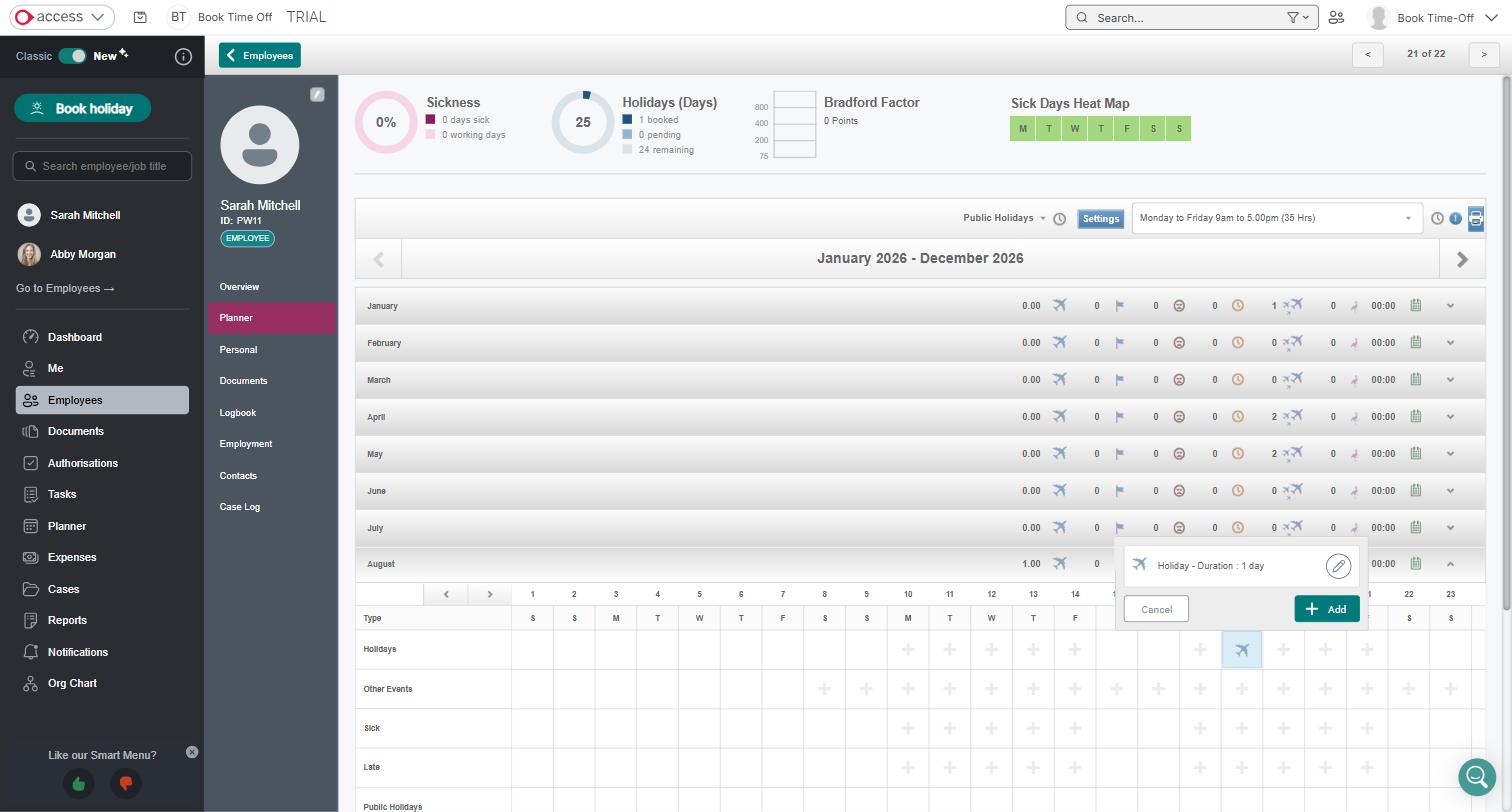
We tested booking some time off with our Admin account and it was automatically approved, deducted from the allowance and added to the calendar system. A simple and effective process from PeopleHR.
The only surprise for us was that the leave was automatically approved because we were an admin, rather than going to an inbox. It kind of makes sense but an option to put it in an inbox instead of auto-approve would mean you could add it for a different approver to get the alert. After all, even admins don't always sign off their own leave.
PeopleHR
Book Time Off

Broadly speaking PeopleHR got this dead on · a simple request, approve, deduct and display-on-calendar workflow. We went for the same thing but added a toggle for admins to choose if they want to approve immediately or add the request for someone else's approval.
One flat price, everything switched on
No tiers to climb and nothing held back for an upgrade. Slack, Teams, Outlook sync, single sign-on and full reporting are all included for £1 per user / month.
Settings and admin
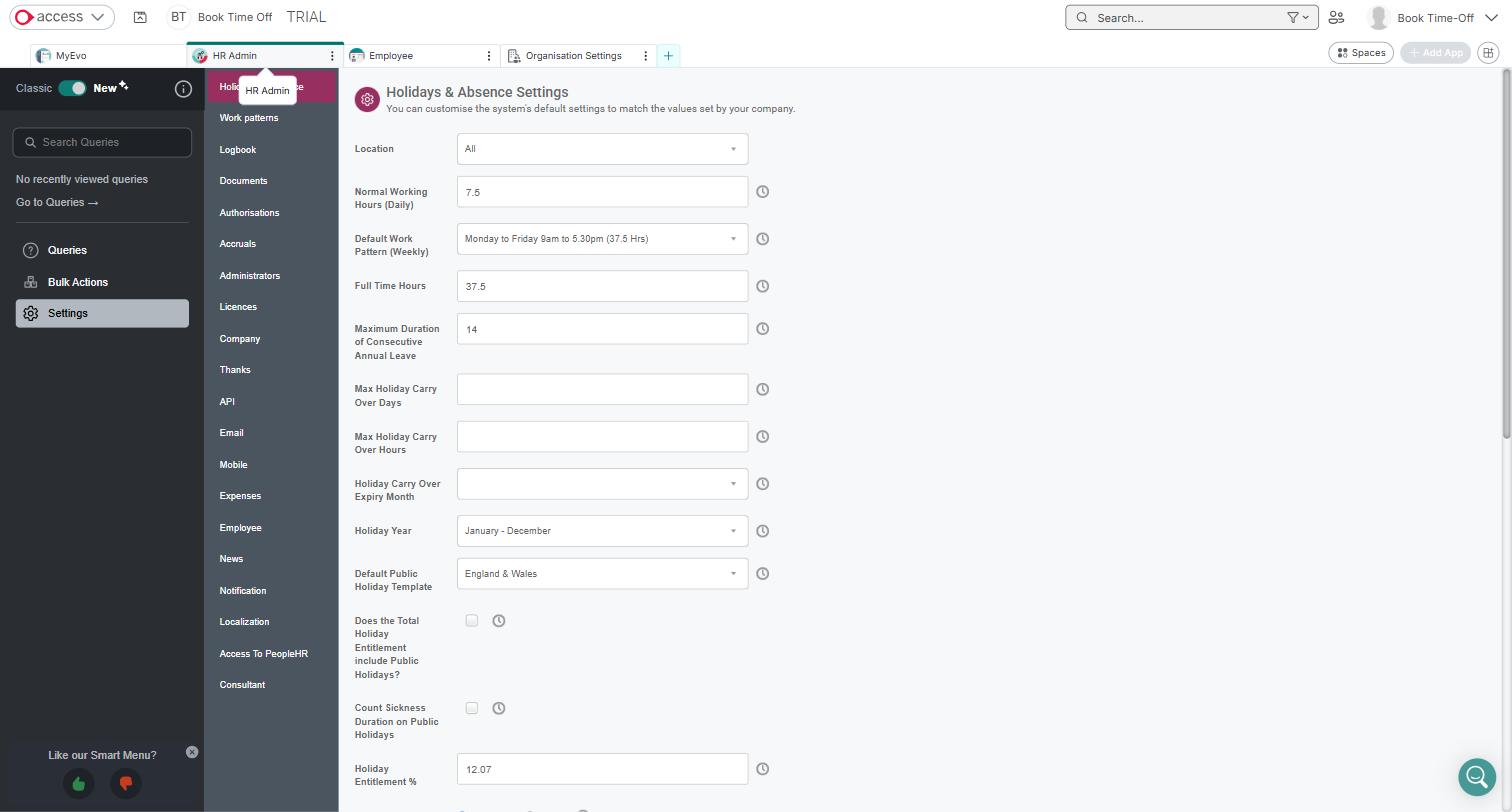
Here's where you really feel the built-to-scale side of PeopleHR. With 3 separate surfaces (employee, org-wide and HR admin) holding 19 sidebar categories. The Holidays & Absence Settings alone holds more than 10 fields.
If you want something you can tinker with or have a dedicated HR person to set all this up for you then it is truly impressive how many options you have to choose from.
PeopleHR
Book Time Off

Options are great but we felt that small business owners really want something that works out of the box and lets them choose the basics to suit their business.
That's why Book Time Off's settings are one flat page: General, Leave policy, Departments, Blocked dates, Notifications, Integrations, and Data & Account. Nothing nested two menus deep, nothing split across three different workspaces to configure one thing.
Integrations
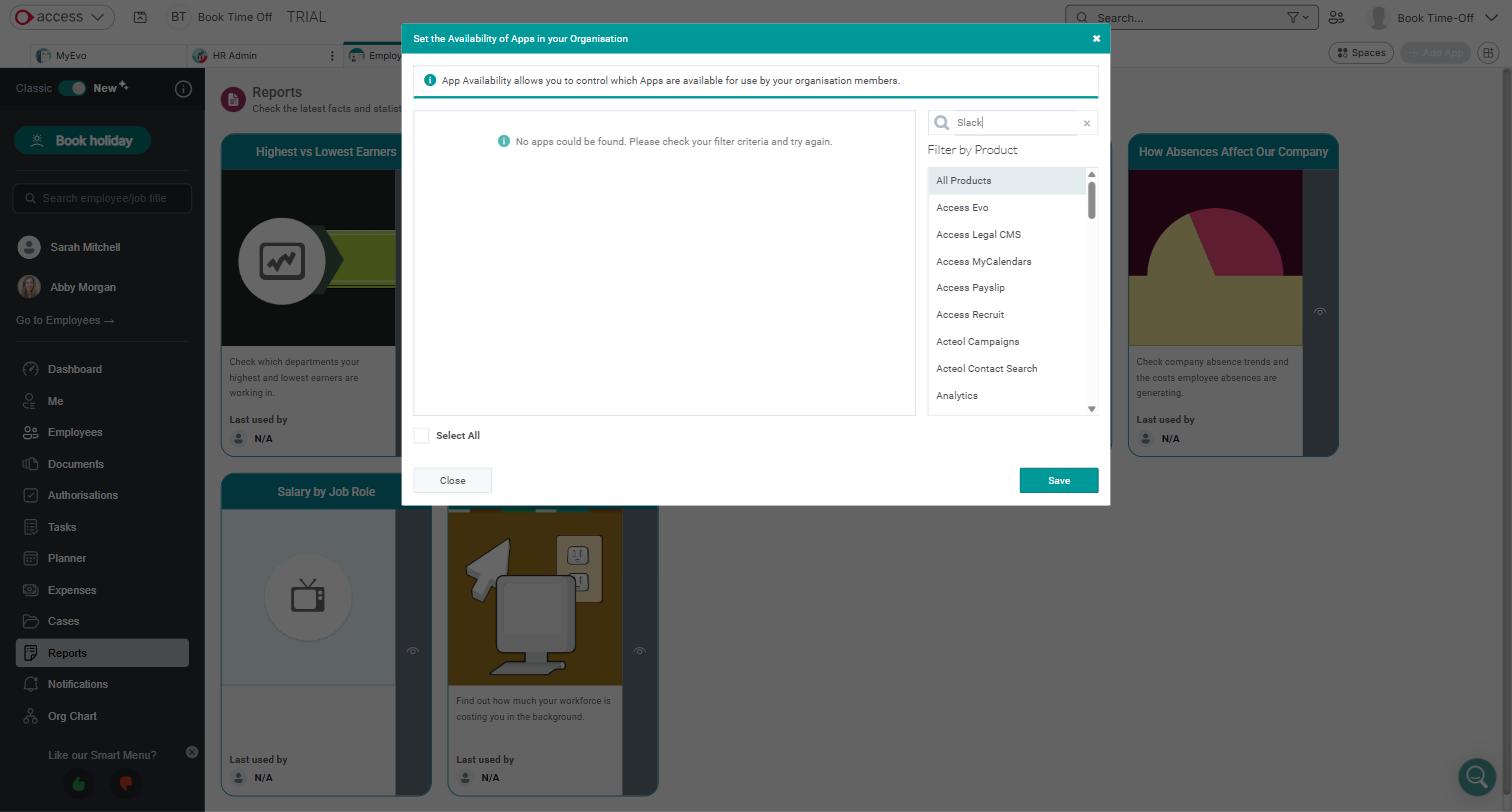
Access Group clearly have their own ecosystem that they'd like you to embrace. That's why you won't find a dedicated integrations page aimed at Microsoft, Google or Slack.
Instead, you get an internal app availability panel listing Access-branded products. We searched but couldn't find Slack, Microsoft Teams, Google Calendar or Outlook anywhere.
PeopleHR
Book Time Off

We know that most businesses start out on the usual platforms · Microsoft Office, Google Workspace or Slack. That's why we worked hard on making sure Book Time Off sits comfortably alongside and within those.
Simple, few-click set ups and obvious functionality and features that make sense if you aren't ready to take on a whole HR ecosystem just yet.
Reporting
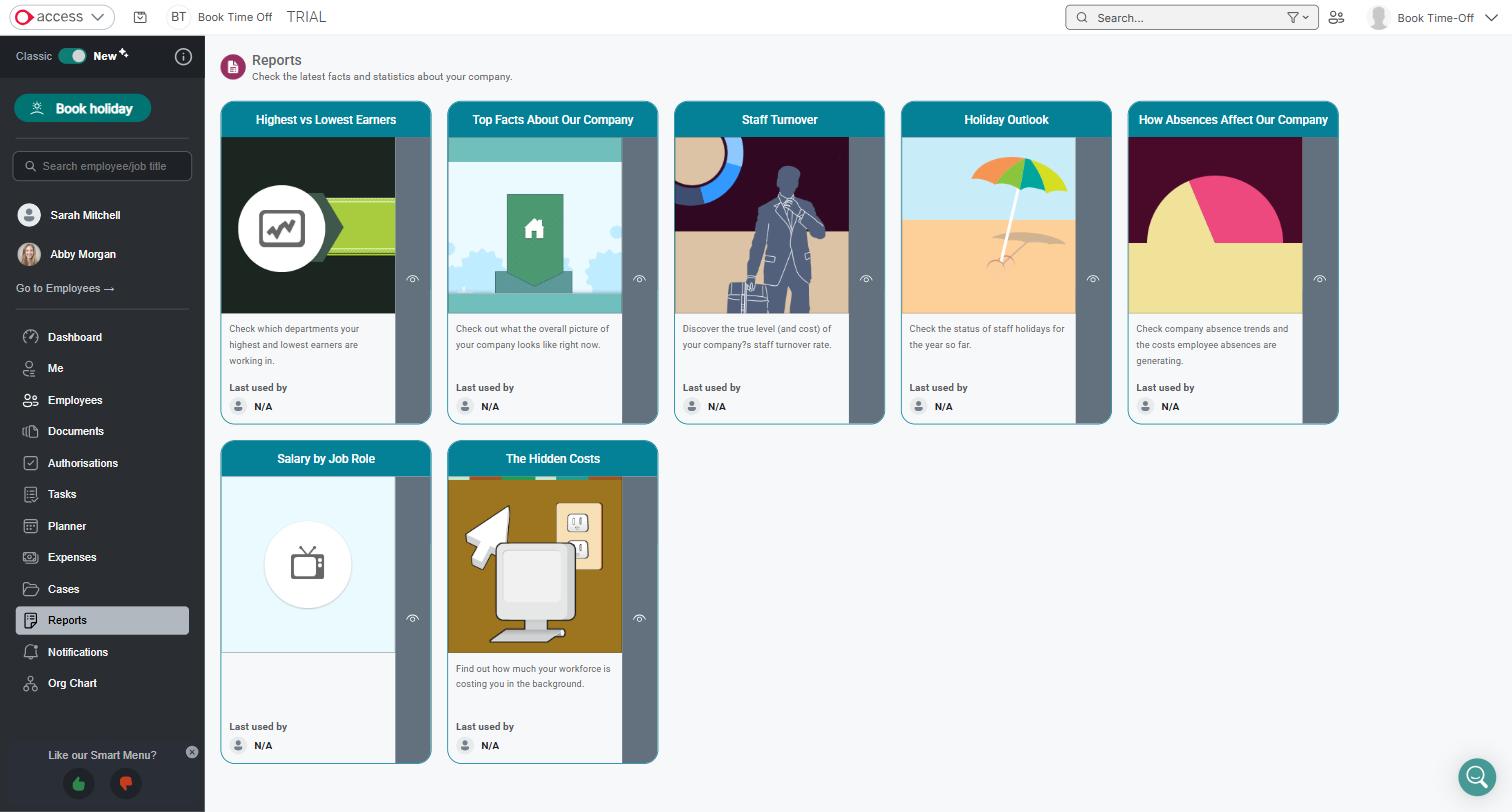
There were seven impressive built in reports available to us in the trial however we checked the features on each tier and it's not clear which of these you'll get in the essential analytics vs the advanced analytics in the Elite+ tier. The price is a lot different so it's worth noting.
There are some interesting reports in there too · highest vs lowest earners and staff turnover are genuinely unique however in a team of 10, you might already know it without needing to consult an online dashboard.
PeopleHR
Book Time Off

We really love the idea of reporting that grows with a business. Ours is more concerned with leave patterns, knowing when the bottlenecks or short-staffed times are in your year and patterns of things like sick leave.
The key however is that we've ensured all of our reports are available to all of our users. There are no tiering systems and everything is included for £1 per user per month.
Pricing
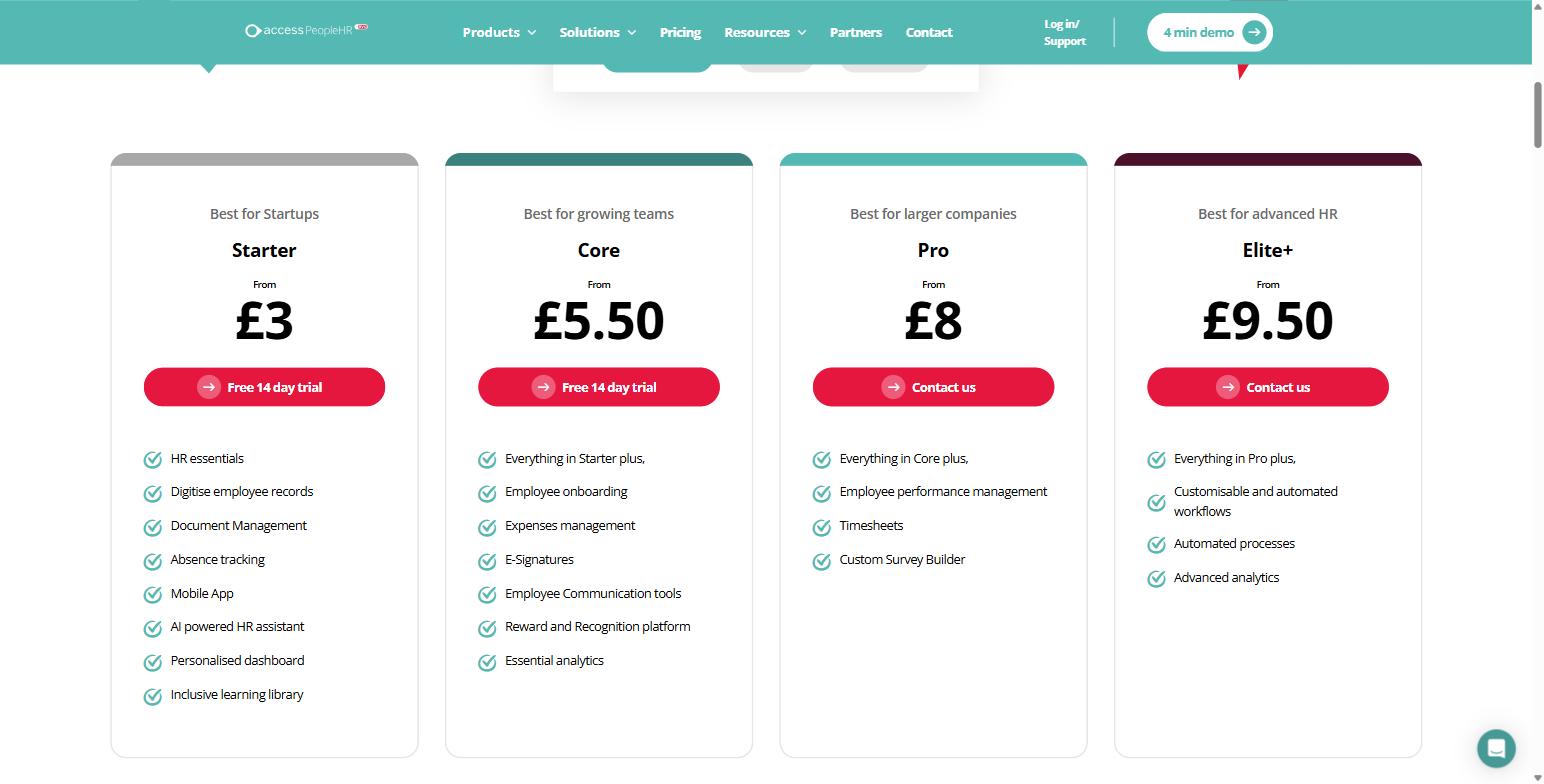
With four price points (Starter at £3, Core at £5.50, Pro at £8 and Elite+ at £9.50) you just know that each tier will lack something that you'll need to pay to upgrade to in the next level up.
It's the classic upselling tactic we found in almost every SaaS leave tracking product we tested. PeopleHR perhaps justify theirs more with the amount of functionality on offer and we said at the start that their pricing is hard to compare to as the offering is so different.
PeopleHR
Book Time Off

If you extrapolate the holiday tracking parts that's where you find Book Time Off coming in at the lowest price we know of (£1 per user per month) whilst also offering the high end features of most of its competitors.
The bottom line
PeopleHR is a capable, enterprise-grade HR system that happens to include holiday tracking, not a lightweight leave tracker that happens to be thorough. Its employee data model is genuinely deep, and its reports are honestly good once you're on a tier that includes them.
But getting there means a shared SSO login, a personal HR dashboard as your landing screen, leave rules split across two overlapping settings screens, admin bookings with no approval step to actually test, no real integration with the tools your team already uses, and a price that starts three times higher than Book Time Off's before any of that enterprise depth kicks in.
We built Book Time Off for the business that just wants to track who's off, not run a second HR department to do it.
Set up your team in minutes
If you're weighing up your options then you'll want to take Book Time Off for a spin. It's simple and offers the lowest price for the greatest features.