Most businesses track staff holidays in four ways depending on their size · starting with a shared calendar for a couple of people, then a spreadsheet, dedicated holiday tracking software and potentially a full HR suite if they grow to more than 100 staff. The vast majority of 5 to 100 people teams use simple leave tracking software because it's cost effective and gets rid of the headaches that come with spreadsheets. This guide compares five different options for tracking leave so you can see what's best for your team.
Whatever the reason, this guide walks through all the options · from a plain calendar through to a full HR suite · so you can see what fits your team now.
Our story with holiday tracking
When we started our company, the last thing on our mind was approving holiday requests or keeping an eye on annual leave balances. It didn't seem important. But as we hired people, it quickly became clear how much it mattered to them · they wanted to know how much leave they had and to be able to take it with as little friction as possible. We knew how important it was to have a positive and engaged team so what didn't seem important once, became a big focus!
With just a couple of us, it was simple · we told each other and wrote it on the calendar. No problem. It stayed that simple even when we went digital and started adding dates to each other's Outlook calendars.
Then we hired a handful of people and spreadsheets stepped in. That worked · until we had seventeen different versions saved, most of the formulas had broken at least once, and nobody really knew how to fix any of it. Time for another change...
We moved to an online holiday tracker software and that was the biggest step up. We could choose who signed off holidays in each team, approve or decline requests in a couple of clicks, and see at a glance who was off and who still had leave to use. Importantly it didn't break like our spreadsheet and our managers weren't fielding hundreds of annual leave queries that were easy to miss or answer wrongly. Efficient, simple and effective.
The next leap didn't come until we were much bigger. Past 100 people, it made sense to move to a proper HR suite that integrated with payroll, stored employee documents securely, and helped with contracts and employment law. The leave tracking itself didn't change much · we just needed more around it. Broader software but not a huge change for tracking holidays.
Every business is unique of course · with great comms you can probably manage with a calendar for longer than we did and if you're an expert spreadsheet hacker that might serve you for years but we'd be surprised if the benefits of holiday tracking software vs its low cost don't work best for the vast majority of businesses
Top 5 ways to track staff holidays
1. Shared Calendars
The most simple option is to start with a shared calendar. It could literally be a paper calendar on the wall of your office or, more likely, you'll use your Outlook or Google calendars. All of these offer shared calendars that are easy to setup. You can add your own leave dates and the rest of your team will see who is off. It's simple, free and works well with a few of you where there's good communication and understanding.
We found it worked well with the founders but once we hired a team they wanted to know how many days of leave they had left and we needed a way to approve or reject, avoid clashes and make sure everyone got a fair deal with their holidays. Enter spreadsheets!
A shared calendar shows who is off, but not how many days anyone has left, and nothing stops two people booking the same week.
| Best for | Very small teams (two to four people) in one location, with one person approving everyone's leave informally. |
| How to set up | Create a shared calendar in Outlook, Google Calendar or similar. Add each person as an editor and agree on a colour or label for "on leave". |
| Advantages | Free. Everyone already has the tool. No new login to remember. |
| Drawbacks | No record of how many days someone has left. No approval step, so clashes go unnoticed until someone's already booked flights. Nothing stops entries being deleted or double-booked. Doesn't scale past a handful of people. |
2. Teams or Slack
At it's most basic level this isn't too disimilar to using Outlook or Google calendars and you could use Teams or Slack in similar ways. That said, you might have also noticed that there are apps which you can add in to help you with tracking holidays and leave. Book Time Off is one option that let's you request and book leave using a chat facility within Teams or Slack (see how the Slack integration works) · it gives a regular digest of whos off and approvers get DMs to accept or decline bookings.
This simple solution is perfect for remote based companies that communicate and work within these channels already. You can stay on platform and handle holidays where the conversation is already happening. The built in options can be a bit limited though so choose something that offers things like allowance tracking and company wide reporting. Unless you're really precious about keeping everything natively inside Teams or Slack then you'll probably get more functionality out of online leave tracking software for the same price. More on that later...
With the Book Time Off app connected, approvers get a Slack DM with one-click Approve and Decline buttons, right where the team already works.
| Best for | Teams that live in Teams or Slack all day and want a lightweight way to see who's off, without asking everyone to log in somewhere new. |
| How to set up | Install a leave-tracking app or bot from the relevant app store, connect it to your team's channel, and set up who can approve requests. |
| Advantages | No extra login. Requests and approvals happen where the conversation already is. Quick for small teams. |
| Drawbacks | Most built-in options are basic · allowance tracking is often limited or missing entirely, and there's little in the way of company-wide reporting. If you ever move off Teams or Slack, your leave history usually doesn't move with you. |
3. Spreadsheets
The humble spreadsheet is the go-to for most companies at some point in their early growth phase. They're yours to customise so you can make them as simple or complicated as you like (or your technical abilities will allow you!). If you're building it yourself we suggest starting with a simple timeline along your column headers with team members on each row.
Keep the formulas simple and limit the number of tabs so that you're not linking too much between them as they break all to easily. Choose your levels of shared access too to avoid multiple versions being saved! Our spreadsheet served us well until two things happened · we got to about 5 employees and we had more than one holiday approver. The formulas broke way too often and the limited access meant relentless questions from the team on how many days have I got left and does anyone have X date booked already.
We needed something everyone could see, didn't break and gave the options to assign approvers who got alerts to approve or reject leave. That's when we took the leap to leave tracking software...
The same sheet, a few months and a couple of editors later: a broken formula, two versions in circulation and nobody sure whose leave is actually approved.
| Best for | Cost-conscious teams up to around five people, with one confident spreadsheet owner willing to maintain it. |
| How to set up | Build one tab per person, or one shared grid, with formulas to calculate days used and days remaining, and enter requests manually. |
| Advantages | Free or very cheap. Fully customisable. Works offline. |
| Drawbacks | Formulas break, often silently. Multiple saved versions cause conflicting information. There's no mobile-friendly way to request leave, no approval trail, and usually one person becomes the bottleneck who has to keep it updated. |
4. Holiday Tracking Software
We didn't realise how much time and energy our holiday spreadsheet took up until we left it behind. For the founders there were no more broken formula or conflicted copy headaches, we could approve leave from our phones any time of day and not have to enter the dates manually and, most notably, the conversations about who's off when or how many days people had remaining, virtually disappeared. The simple things like having public holidays populated and being able to book leave around them without it being deducted from allowances really set it apart from our spreadsheet. The team loved it as they knew where they stood, had an easy system to use and could plan leave without having to bring it up in 1-2-1 meetings.
When we built Book Time Off we knew how important it was to get the calendar, wallchart and approvals right. We also wanted to give companies a way to track patterns in leave to account for busy periods and to ensure their staff were getting the time off they needed to avoid burnout. And to tick all the boxes of using calendars or chat platforms we made sure it integrates to work wherever you are · Outlook, Teams, Slack or Google.
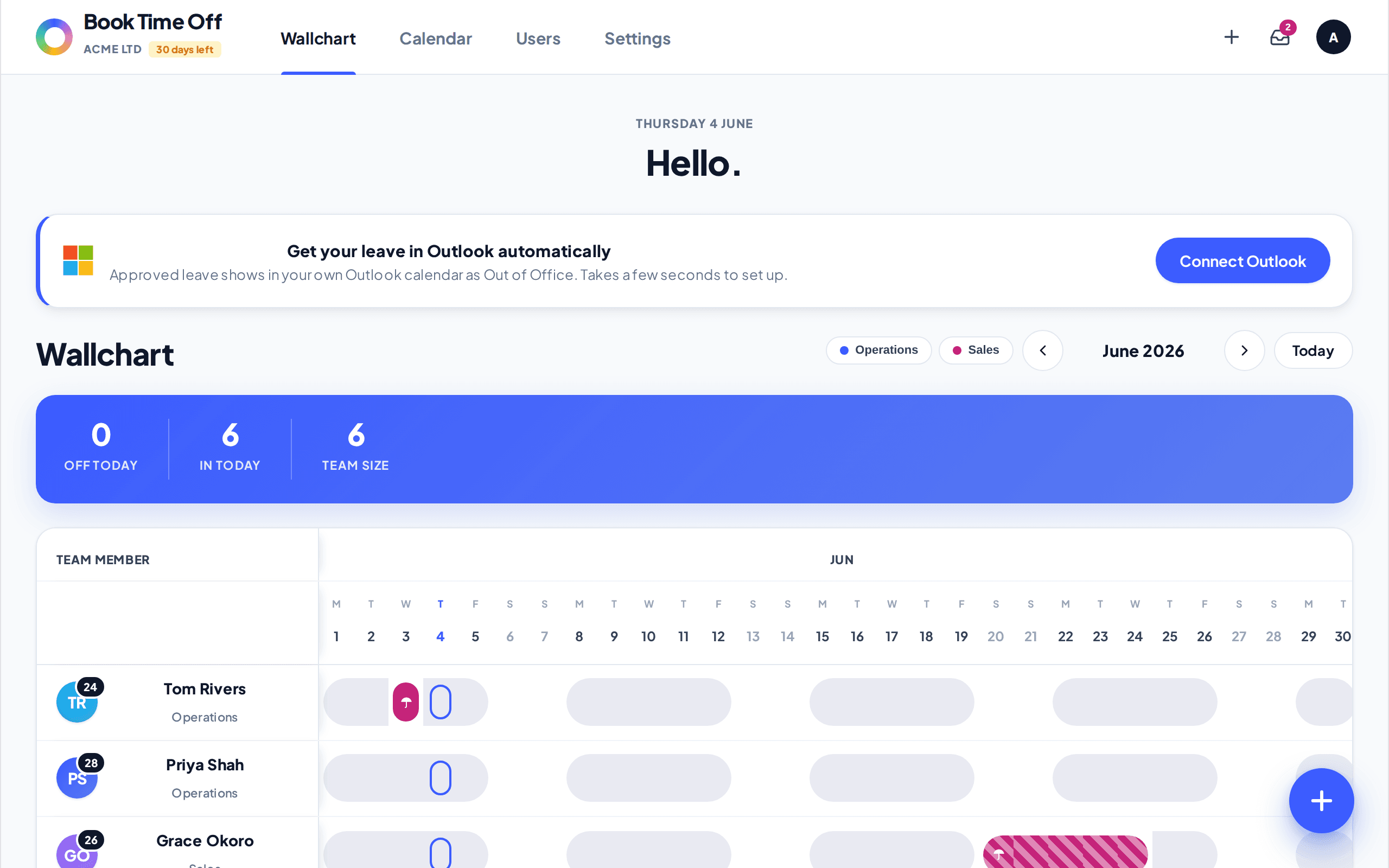
Dedicated software puts the whole team on one wallchart, with each person's remaining allowance updated automatically as leave is booked and approved.
| Best for | Growing teams of around 5-100 people who want a proper system, without paying for a full HR suite they won't use. |
| How to set up | Sign up, set your default holiday allowance, invite your team, and connect the calendar or chat tools you already use. |
| Advantages | Everything in one place · calendar, wallchart, approvals, allowance tracking and reporting. Public holidays are usually built in automatically, so nobody has to remember to add them. Purpose-built for leave, so nothing gets missed. |
| Drawbacks | Very few just make sure you choose one that comes with advanced features like reporting and integrations included in it's headline price. |
It's not a mockup. Invite your team, connect Outlook, Teams, Slack or Google, and everyone sees who's off and how many days they have left. Approvals take a click, or happen straight from a Slack DM, and public holidays are already in there. Set it up and see who's off at a glance, minutes from now.
→ Start your free trial5. HR Suites
A small number of much larger organisations might benefit from integrating their leave tracking in to a wider HR eco-system. Once you get beyond 100 employees you start to think about something that helps you manage contracts and payroll, keeps logs of training and documents everything you need. Most of these larger HR suite systems bundle in leave tracking though it's much the same (if not more simple and limited) than the dedicated holiday tracking software options.
There's no real drawback here and they're great facilities but if you don't need everything they offer (and few companies of less than 100 do) then you'll be paying over the odds for things you just don't need. Leave tracking is often a sideline or bolt on to these larger suites so our experience is that many upgrade to the suite but keep the leave tracking with their original holiday tracker anyway.
In a full HR suite, leave tracking is one module among many: powerful if you need payroll, contracts and records in one place, overkill if leave is all you're really after.
| Best for | Businesses past around 100 employees, or any business that needs payroll, contracts and employee records handled in the same place as leave. |
| How to set up | Onboard with the vendor, migrate employee records, and configure leave policies alongside payroll and contracts. |
| Advantages | One system for leave, payroll, documents and compliance. Built for complex organisational structures. |
| Drawbacks | Expensive relative to the leave-tracking features on their own. Longer to set up. You'll likely pay for · and manage · features you never touch if leave tracking is your main need. |
How do the 5 options compare side by side?
| Method | Typical cost | Best team size | Approval workflow | Public holidays included | Mobile-friendly | Reporting |
|---|---|---|---|---|---|---|
| Calendar | Free | 2-4 | No | Added manually | Depends on app | None |
| Teams / Slack add-on | Free-low | 2-5 | Basic | Rarely | Yes | Minimal |
| Spreadsheet | Free-low | Up to 5 | No | Added manually | Poor | Manual only |
| Dedicated leave software | Low, flat fee per person | 5-100 | Yes | Yes | Yes | Yes |
| HR suite | High | 100+ | Yes | Yes | Yes | Advanced, plus payroll and HR |
What's the best way to track holidays for most businesses?
It mostly depends on your size, but for the vast majority of small and medium businesses with 5 to 100 employees, dedicated holiday tracking software · like Book Time Off · gives the best outcome for the lowest cost. You get a calendar, a wallchart, allowance calculations and approval workflows built in, plus the ability to connect the tools you already use, such as Outlook, Teams, Slack or Google. The best options also add reporting so you can spot patterns in leave and help your team avoid burnout without any of the cost or complexity of a full HR suite.
If you're past 100 people or you need payroll and contracts handled alongside leave, a full HR suite is worth the extra cost · just don't reach for one before you actually need it.
If you're in that 5 to 100 range, there's nothing to work out on paper. Set up your people, book a few test days and watch the balances update and the clashes flag themselves. You've got 30 days free to decide, with no card and nothing to cancel.
→ Start free trialWhat should you check before choosing?
A few questions to work through, whatever option you're leaning towards:
- How many people need to request or approve leave, and does more than one person need to approve?
- Is your team remote, hybrid or based in one office, and do requests need to work from a phone?
- Do you already rely on Outlook, Google, Teams or Slack, and would you want leave requests to happen inside those tools?
- How many public holidays does your country · or each of your offices, if you have more than one · observe, and who's responsible for keeping that list current?
- What do you need to report on: just who's off this week, or trends over the year?
- Is leave tracking the only thing you need, or do you also need payroll, contracts and employee records handled in the same place?
Does holiday tracking work the same way across Europe?
The mechanics above apply everywhere, but the details underneath them don't. Statutory minimum annual leave, how public holidays are counted, and carry-over rules all vary by country · sometimes significantly, even between neighbouring ones. If you work internationally this could be important and Book Time Off allows you to select your country, knowing that the local standards are pre-built for you.
Related reading
Sources
This guide describes methods and general practice, not country-specific statutory entitlements. For your own country's statutory minimum leave, public holiday list and carry-over rules, check your national government's official labour or employment website. (Checked: July 2026.)
| Citizens Information | Annual leave · Verified July 2026 |
| Workplace Relations Commission | Public holidays · Verified July 2026 |